


Web App vs. Mobile App vs. Progressive Web App: What...
The web app vs mobile app vs progressive web app decision is one of...
 Deepak Saini
March 21, 2026
Deepak Saini
March 21, 2026

The web app vs mobile app vs progressive web app decision is one of the earliest and most important product choices a business will make. Get it right, and your platform fits your users naturally, scales efficiently, and justifies its development cost. Get it wrong, and you rebuild eighteen months later at two to three times the original investment.
The web vs mobile app decision is not just a technology choice. It is a business decision, shaped by user behavior, distribution requirements, feature complexity, budget, and timeline. Yet most teams approach it by defaulting to what feels familiar rather than what the evidence supports.
This analysis gives product leaders, founders, and CTOs the framework to make this decision based on business requirements rather than engineering preference or vendor recommendation.
For teams early in product planning, deciding the platform first is important. It can prevent budget waste and costly system changes later.
The distinctions between these platforms are frequently oversimplified. Understanding what each option means in practice, not just technically, is necessary for making the right decision.
A web application runs in a browser and requires no installation. It is accessed via URL, works across devices and operating systems without separate builds, and is updated server-side without any user action. Delivery is frictionless: share a link, and any device with a browser can access the product.
The trade-off is capability. Web apps cannot access most device hardware, cannot send native push notifications without additional setup, and depend entirely on network connectivity for functionality. For products where these constraints are acceptable, web apps offer the lowest total cost of ownership and the widest possible reach.
Native apps are built specifically for a single operating system, iOS or Android, using platform-native languages and SDKs. They are distributed through app stores, installed on the device, and have full access to device hardware: camera, GPS, accelerometer, biometric authentication, Bluetooth, and offline storage.
The capability ceiling is high, but the cost structure reflects that. Native development requires separate codebases for each platform, store submission and review processes, and ongoing maintenance of platform-specific builds as operating systems update. For products where deep device integration or offline-first functionality is central to the user experience, the cost is justified. For products where it is not, native development is frequently over-engineered.
A progressive web app is a web application built with a specific set of technologies, including service workers, web app manifests, and HTTPS, that enable capabilities traditionally associated with native apps. PWAs can be installed to the home screen, work offline, send push notifications on supported platforms, and load with near-native performance through aggressive caching strategies.
PWAs sit in the middle. They offer broader reach and lower build cost than native apps, while providing more features than a standard web app. The limitation is that iOS support for PWA features, particularly push notifications and background sync, has historically lagged behind Android, though this gap has narrowed significantly in recent versions of Safari.
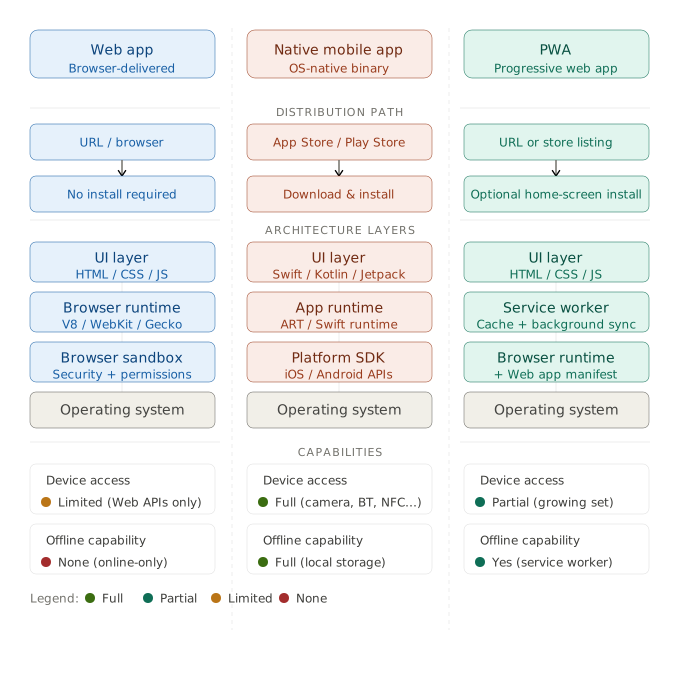
The most productive way to frame this comparison is not by technology but by the specific capabilities your product requires and the user behaviors it needs to support.
| Capability or Requirement | Web App | Progressive Web App | Native Mobile App |
|---|---|---|---|
| Installation required | No | Optional | Yes |
| App store distribution | No | No (or optional) | Yes (mandatory) |
| Offline functionality | No | Yes (with service workers) | Yes |
| Push notifications | Limited | Yes (Android fully, iOS partially) | Yes |
| Device hardware access | Limited | Moderate | Full |
| Cross-platform from one codebase | Yes | Yes | No (unless React Native or Flutter) |
| Performance ceiling | Moderate | High | Highest |
| Initial build cost | Lowest | Low to moderate | Highest |
| Update deployment speed | Instant | Instant | Subject to store review |
| Discoverability via SEO | Full | Full | None |
No single platform wins across all dimensions. The right answer is determined by which rows in this table are non-negotiable for your specific product and user context.
Statistic
Google reports that PWAs increase average session time by 2x, reduce bounce rates by up to 42%, and improve conversion rates by 36% compared to standard mobile web experiences, making them a commercially significant choice for content and commerce products.
Native apps are the correct choice for a specific, well-defined set of product scenarios. Outside those scenarios, they are frequently the most expensive solution to a problem that a PWA or web app would solve adequately.
Applications that depend on continuous GPS tracking, Bluetooth peripheral connectivity, camera processing at frame level, or biometric authentication flows require native development. Fitness tracking platforms, field service management tools, augmented reality applications, and medical device companions fall into this category. The device hardware access gap between native and PWA is narrow for casual use cases and wide for intensive ones.
For applications used in environments where network access is irregular or unavailable, such as logistics and delivery, construction site management, or remote field operations, native apps with robust local storage and sync architectures remain the most reliable choice. PWAs have improved offline capability significantly, but complex offline data syncing with conflict resolution is still more predictably implemented natively.
App store presence creates a persistent icon on the user’s home screen, enables native push notification delivery, and signals product credibility in markets where app store presence is an expectation. For consumer products where daily active usage and retention are primary KPIs, native development often produces better engagement metrics, though the delta versus a well-implemented PWA has narrowed greatly.
Businesses building native applications should work with a mobile app development team that has demonstrable platform-specific experience, as iOS and Android development require distinct architectural patterns and release management disciplines.
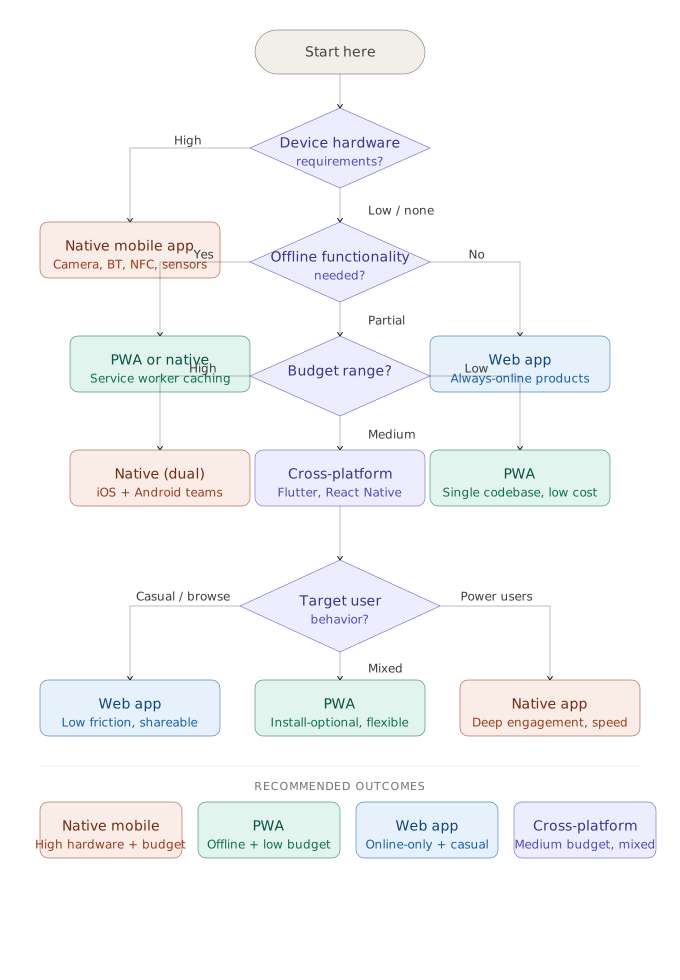
The PWA vs mobile app comparison is where most product teams underestimate what is now achievable without native development. For a substantial portion of product categories, a well-built PWA delivers equivalent user outcomes at significantly lower build and maintenance cost.
News platforms, media sites, and content subscription products were among the earliest and most successful PWA adopters. The Washington Post and Forbes both reported measurable improvements in load time, session duration, and ad revenue after PWA implementations. For content products, SEO discoverability combined with app-like performance and home screen installation makes the PWA the architecturally correct choice.
E-commerce platforms that serve users across both desktop and mobile benefit significantly from the PWA model. A single codebase handles all device types, installation is available without app store friction, and the performance improvements from service worker caching directly reduce cart abandonment. Alibaba’s PWA setup produced a 76% increase in total conversions across browsers, with iOS conversion rates increasing by 14%.
For B2B software products accessed primarily on desktop but used occasionally on mobile, the argument for native app development is rarely justified by the usage data. A responsive web app or PWA serves the majority of users at a fraction of the cost, and the small percentage of users who need mobile-first access are typically well-served by a PWA with offline caching for core workflows.
Teams evaluating progressive web app development for their SaaS product should map their core user workflows against the PWA capability set before assuming native is required.
When evaluating the web app vs mobile app decision, cost comparisons between platforms often focus only on the initial build cost. The full cost picture includes distribution, ongoing maintenance, and the operational overhead of managing platform-specific release cycles.
| Cost Factor | Web App | Progressive Web App | Native iOS + Android |
|---|---|---|---|
| Initial build cost | Lowest | Low to moderate | Highest (2x to 3x web) |
| Cross-platform cost | Single codebase | Single codebase | Two codebases (unless cross-platform framework) |
| App store fees | None | None | $99/year (Apple), $25 one-time (Google) |
| Update deployment | Instant, no review | Instant, no review | 24 to 72 hour review cycle per update |
| Annual maintenance cost | Low | Low to moderate | High (OS updates, platform API changes) |
| QA scope | Browser and device testing | Browser, device, and PWA feature testing | Full platform-specific QA for both OS versions |
For businesses comparing native iOS and Android development against a cross-platform alternative, using frameworks such as React Native or Flutter introduces a middle option that shares much of the codebase while maintaining near-native performance. This model reduces native development cost by 30% to 50% depending on feature complexity, though it introduces its own maintenance trade-offs when platform APIs diverge.
Key Insight
The app store review cycle is a frequently underestimated operational cost of native development. Critical bug fixes that take minutes to deploy on a web platform can take 24 to 72 hours to reach users on iOS, with no guarantee of approval on first submission. For products where rapid iteration is a competitive requirement, this constraint materially affects development velocity.
Each platform carries genuine limitations that should be evaluated honestly rather than minimized in the planning phase.
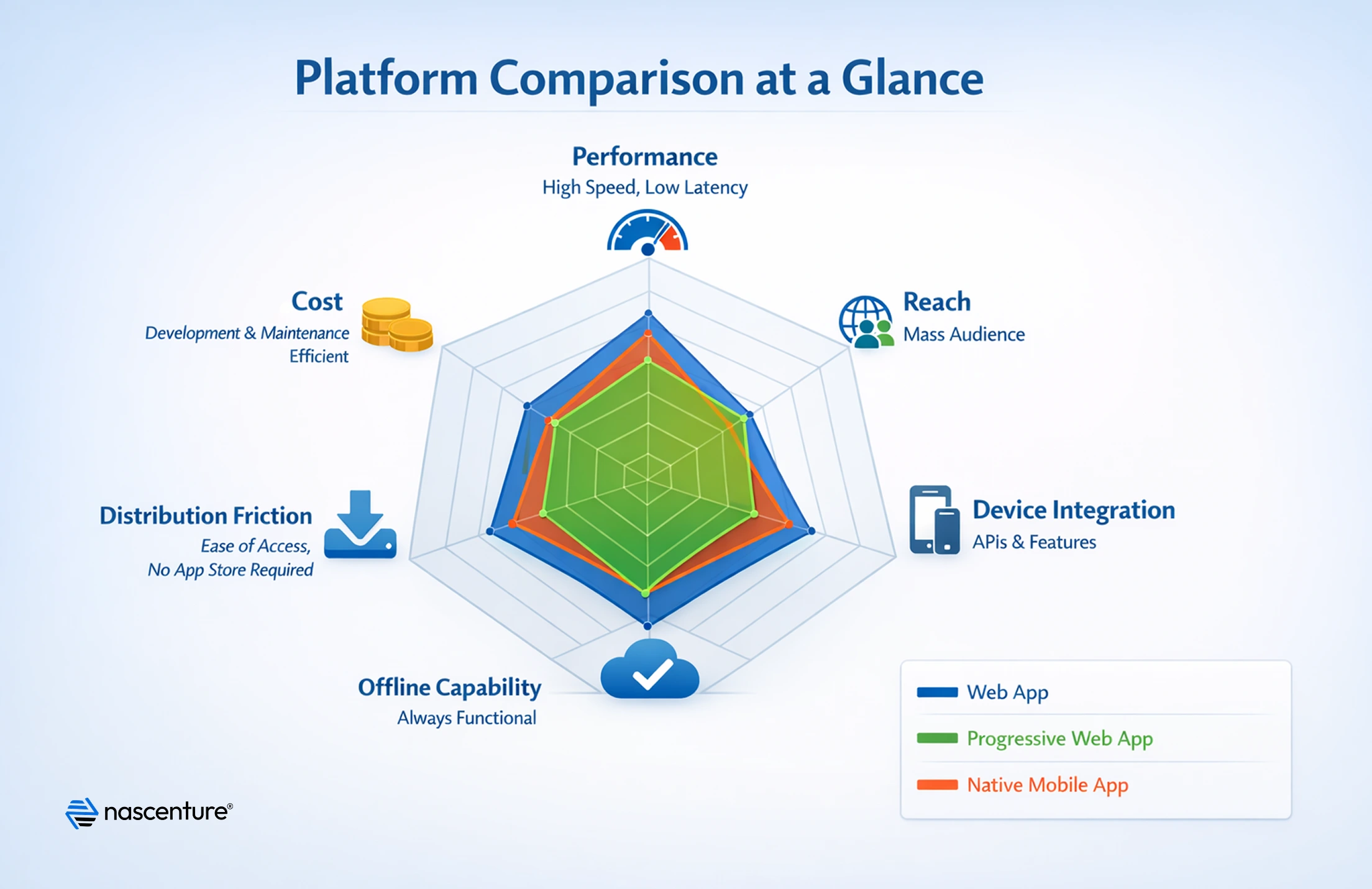
The following recommendations are grounded in the patterns that consistently produce well-matched platform decisions across different product categories and business contexts.
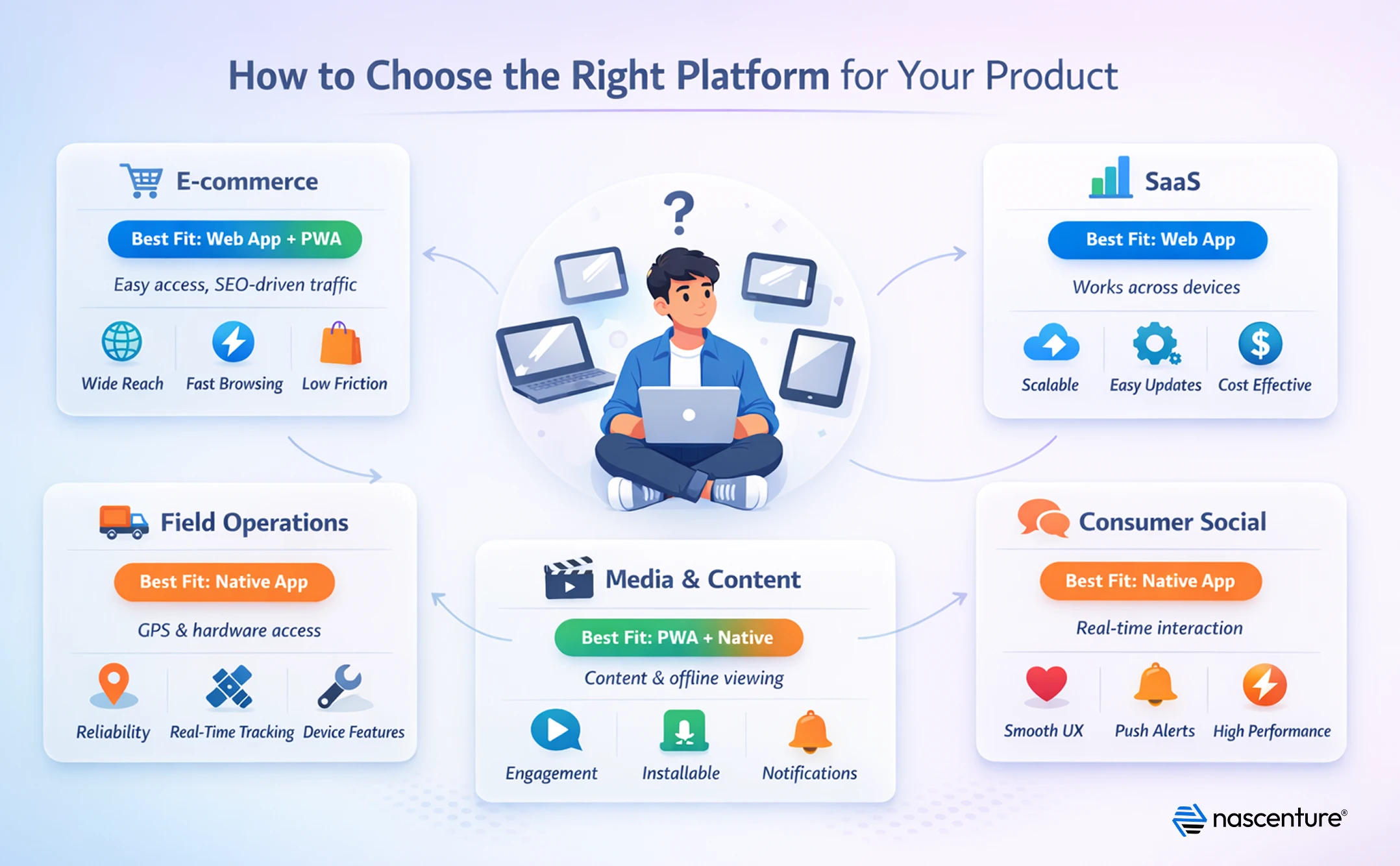
If you are working with an external web application development partner to build your product, request a platform recommendation that is backed by your specific requirements analysis, not by the vendor’s preferred technology stack or commercial interests.
We assess your requirements, behavior, and budget to build a platform that delivers strong long-term ROI.

The web app vs mobile app decision does not have a universal answer. It has the right answer for your specific product, user base, budget, and feature requirements. Web apps offer the lowest cost and widest reach for products where browser-based access is sufficient. Native apps are justified when deep device integration, complex offline behavior, or platform-specific performance is genuinely central to the user experience. Progressive web apps occupy a well-defined middle ground that delivers app-like ability at web-level cost, and for a growing number of product categories, they represent the highest-ROI platform choice available.
The businesses that make this decision well share a common approach: they start with user behavior and non-negotiable feature requirements, evaluate platforms against those constraints, and resist the pull toward over-engineering. Choosing the right platform is not about building the most technically impressive product. It is about building the right product for the right users on the platform that can sustain and scale it cost-effectively over time.
Working with an experienced software development team that can conduct a structured platform assessment before scoping begins significantly reduces the risk of costly system decisions made on incomplete information.
A native mobile app is installed through an app store and built specifically for iOS or Android, with full access to device hardware and the highest performance ceiling. A progressive web app is a web application that can be installed to the home screen, work offline, and send push notifications, but runs through the browser engine rather than natively on the operating system.
The practical differences that matter most for most businesses are:
Many businesses researching the web app vs mobile app decision ask whether they should build both platforms from the start.
Building both is justified when your user base genuinely splits between desktop-primary and mobile-primary contexts with meaningfully different feature needs for each. B2B platforms with a desktop-centric primary workflow and a mobile companion for field or on-the-go access are a common example.
Before committing to both, validate that the incremental value of the second platform justifies the ongoing dual maintenance cost. Many teams find that a responsive web app or PWA serves the secondary context adequately, eliminating the need for a parallel native build.
For most e-commerce use cases, yes. The core e-commerce workflow, browsing, search, cart management, checkout, and order tracking, does not require native device access. PWAs have demonstrated strong commercial results in retail contexts, with documented improvements in conversion rates, load times, and session engagement compared to standard mobile web experiences.
The exception is e-commerce products where augmented reality product visualization, complex camera-based features, or deep loyalty program integrations with device-level notifications are central to the purchase experience. Those use cases benefit from native capability.
The decision depends primarily on whether your product requires native device APIs that PWAs cannot access. If your feature set is achievable within PWA capability limits, a PWA will cost less to build and maintain with equivalent reach. If your product requires features such as Bluetooth connectivity, background location tracking, complex camera processing, or biometric authentication flows, React Native provides near-native access to those APIs from a shared codebase.
React Native is not a cost-free alternative to PWA. It carries native-level QA requirements, platform-specific configuration, and ongoing maintenance as iOS and Android APIs evolve. Evaluate it against your specific non-negotiable feature list rather than as a default cross-platform choice.
For equivalent feature scope, native iOS and Android development typically costs two to three times more than a PWA, when accounting for separate codebases, platform-specific QA, and ongoing maintenance. The gap widens further over time as each OS update requires platform-specific adjustments.
Using a cross-platform native framework such as React Native or Flutter narrows this gap to approximately 30% to 50% lower than dual-native development, but does not close it entirely. PWAs remain the most cost-efficient option for products where native device access is not a core requirement.

Deepak Saini
Deepak Saini is the CEO of Nascenture, a technology company focused on building scalable digital solutions. With a strong interest in AI, blockchain, and emerging technologies, he helps businesses leverage innovation to drive growth, efficiency, and competitive advantage. He regularly shares insights on software development, automation, and future-ready tech strategies.
Web App vs. Mobile App vs. Progressive Web App: What...
The web app vs mobile app vs progressive web app decision is one of...

Agentive AI: The Ultimate Guide to Human-Centered Ar...
Artificial Intelligence has changed the way we interact with technolog...

A Beginner’s Guide to AI in Real Estate
The real estate world is undergoing rapid change, and AI in real estat...